Designed and built by Sydney cinematographer Graeme Beck, the Hyper 35 makes handheld filming quick and effortless. Its balanced shoulder-mounted design is comfortable for all-day shooting, with easy movement between shoulder, hip and tripod positions.
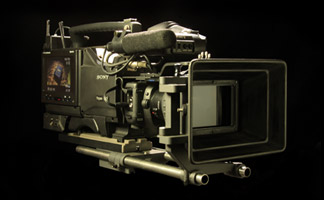
The Hyper 35 rig combines a Canon EOS R5 MKII with a modified Sony Betacam body with a rotating HD electronic viewfinder for superior peaking focus. The design puts practical camera handling first, helping change shooting height from shoulder to hip to tripod quickly as the action unfolds.
The Hyper 35 Rig
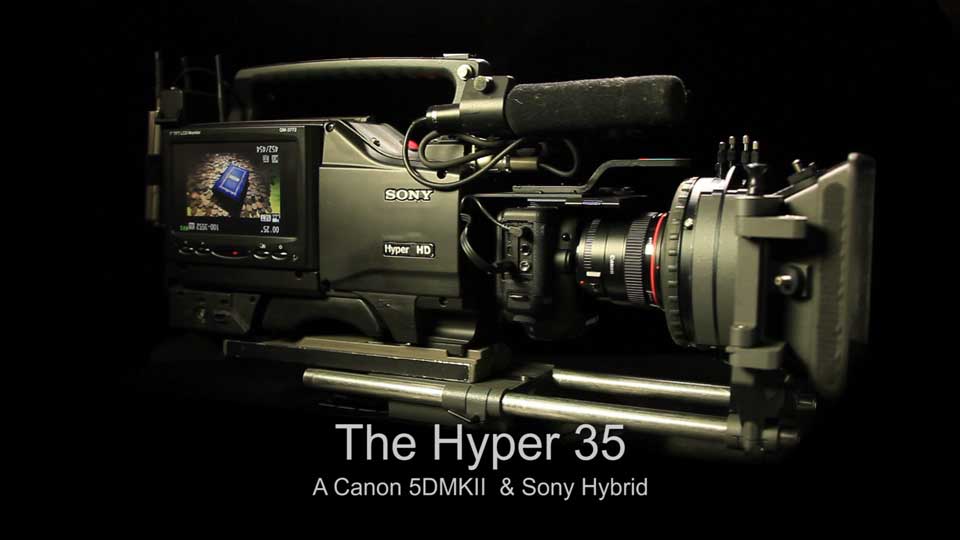
Watch the Hyper 35 rig demonstration on YouTube
The Hyper 35 brings the practical handling of an ENG (electronic news gathering) camera to a compact interchangeable-lens camera. Its main advantage is the ease of handheld operation and shoulder mount for comfortable all day shooting. An impossible task with camera rigs. You can also shoot from the hip for a great lower viewpoint, or clicked onto a tripod when the shot calls for it. Alternatively, the 5D can be quickly detached from the rig for standard tripod mounting or use in tight spaces.
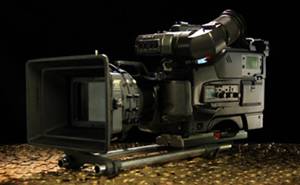
Watch the detailed Hyper 35 walkthrough on YouTube
A quick-release mount lets the Canon body move between the rig and other supports. The viewfinder rotates for different camera heights, while its monochrome image and peaking help the operator judge contrast and focus.
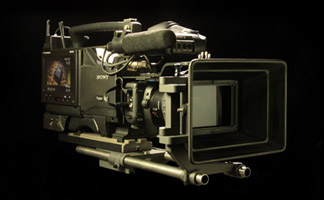
Watch Graeme's explanation of the full-frame look on YouTube
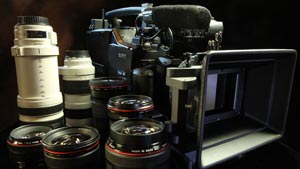
From the 5D Mark II to the EOS R5 Mark II
Graeme's camera progression began when his first Canon EOS 5D Mark II arrived in November 2008, followed by the 5D Mark III in May 2012 and the 5D Mark IV in September 2016.
His latest camera is the Canon EOS R5 Mark II, combines a 45-megapixel full-frame sensor for still photography with 8K video recording. The Hyper 35 story began with the original DSLR rig; the image comparisons below are still relevant today.
Full-Frame Images & Comparison Tests
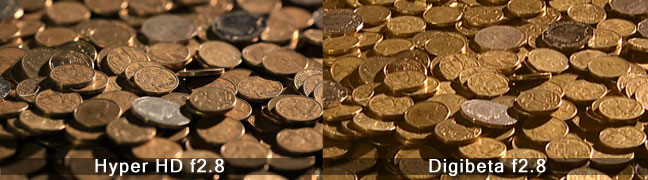
These photographs illustrate differences in framing, background blur and low-light rendering under the settings noted with each example.
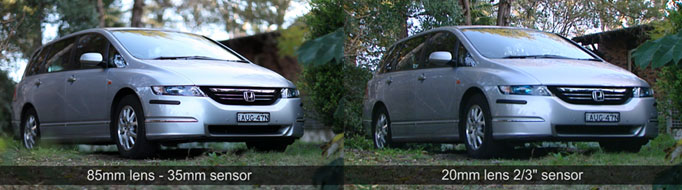
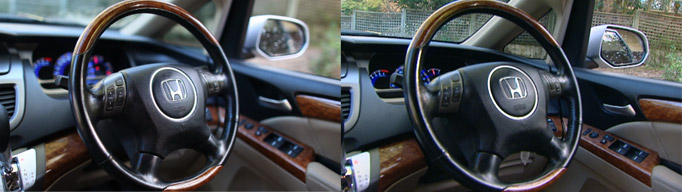
A full-frame sensor allows a longer focal length for similar framing from the same position than a smaller sensor. At the same f-number, this can produce shallower depth of field. Perspective is affected slightly by sensor size if you notice the background pulling in tighter, giving a more natural effect similar to what the eye sees.

Canon 5D full-frame and 2/3-inch camera comparison, recorded as being shot from the same distance at f/2.8.
Canon 5D and XDCAM HD comparison, with both cameras recorded at f/1.8.
Original test notes: a 24mm lens on the Canon and a 7mm lens on the XDCAM HD, both at f/1.7.

Original test notes: a 200mm lens on the Canon and a 50mm lens on the XDCAM HD, both at f/2.8. The examples show how lens and format choices affect background separation.
Shallow Depth of Field
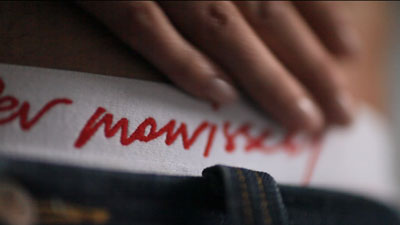
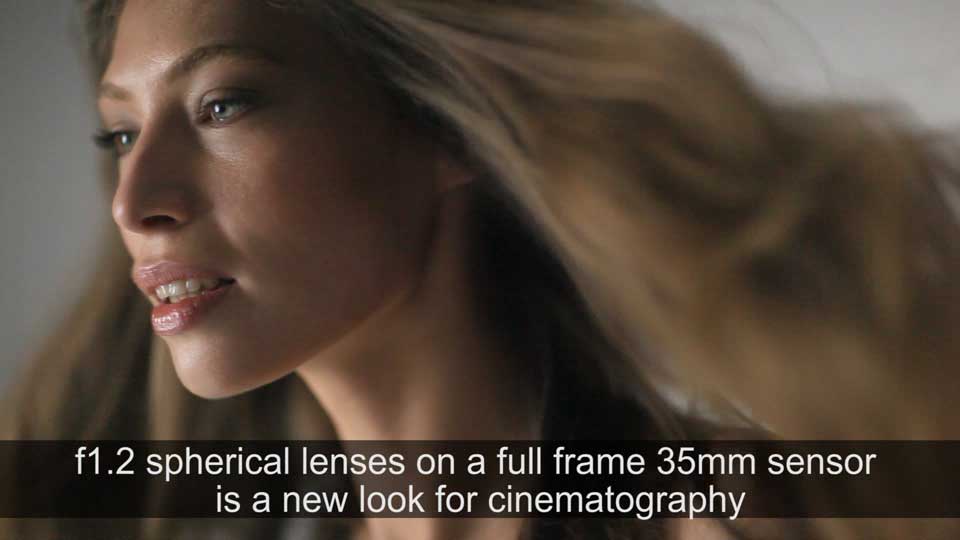
Fast lenses and careful focusing can isolate a subject against a soft background. The examples below show this approach in Graeme's DSLR cinematography.

Low-Light Comparison
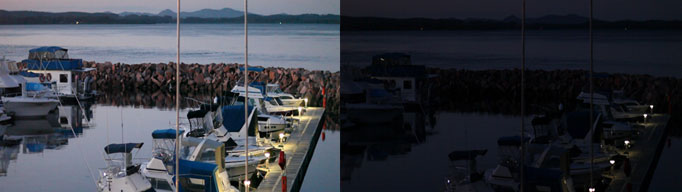
Tests compare the Canon at ISO 6400 and f/1.2 with a Sony 2/3-inch XDCAM at 9 dB gain and f/1.7
Watch the original RED and Canon low-light comparison on YouTube
Understanding the Full-Frame Look
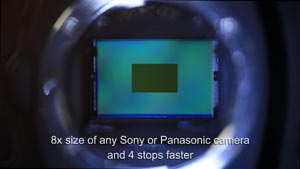
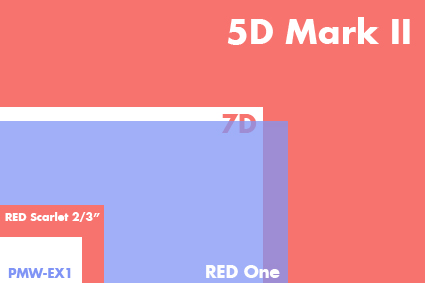
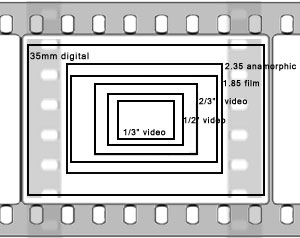
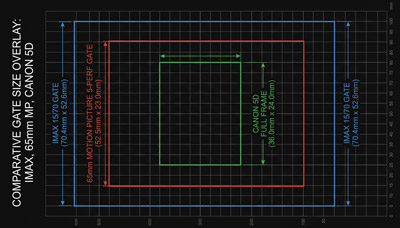
Canon 5D's use a 36 × 24mm full-frame
sensor. A closer comparison to the frame size of a 70mm (65mm camera negative
film) motion picture camera which is 52mm x 23mm. Imax is 70mm x 52mm.
Early Reactions to the Hyper 35
Comments collected during the original development of the rig.
This has to be either the funniest thing I have ever seen or the most genius thing I have ever seen and I cannot work out which!!! It was only a matter of time before someone would do this. I have to say it really is absolute genius/ insane!!! It looks like a big joke, but it isn't April 1st and everything they have done is absolutely feasible with a bit of work! - Philip Bloom, DP/Director UK
Thanks for doing what we all need - put that 35mm sensor in a video camera, how much to own one of these? Edward C David / Director of Photography USA
That camera that you made seems amazing! Sergio, Argentina.
Greetings from Alaska neighbor, I was so very impressed how you fitted a simple 5DMarkii into such a compact unit. - Joe Ray Skrha DP Alaska
Fully fascinated by your cam. Like to sell one or two or three? - Alexander Detig, CEO Sound & Vision
I have been looking for an ENG-style
rig for the 5D. Right on man!! - Christopher Marino, Video Producer San
Francisco
Now that looks sweet! - Doug Stanley, Discovery Channel
Some people are saying this is a photoshop camera. Larry Vaughn Video Production USA
I just wanted to say I think you're a genius. David USA
The hyper 35 is fantastic. Great innovation on that one. Greg Poschman, Aspen, CO
I thought your camera was a wind-up until I looked a bit more closely. Is the camera for sale or only for rental? Oliver Stapleton (UK)
I am so excited after I saw your product on the web, and I am so happy that you did it. - Aurelien Brentraus - Philadelphia USA
Congratulations on what looks like a real game changer in DSLR ENG style acquisition. Ramin, Viceroy Films USA
Just watched your web video on the Hyper-35. Very ingenious! But is it hyper-expensive? John McBride Telepictures Productions
Historical Conversion Notes
Archive: Graeme's original frame-rate conversion notes, written for the software and broadcast workflows of the period, including Premiere CS5. Performance figures and software limitations describe those tests and are not current equipment specifications or general guidance for modern editing systems.
25i/p fps to 24p fps Conversion
How to convert 25fps to 24fps with superior results to any other method. Works in interlaced or progressive and is full resolution.
It can be done in several ways.
One method involves slowing the film down, but this results in a pitch change to the audio and when the audio is corrected by software, it is noticeable in music and singing.
Another method involves dropping the 25th frame but the result is jerky motion.
Twixtor can 'invent' pixels which looks good, but problematic on some images.
In interlaced material, (all stations broadcast in interlace but play a lot of progressive material) Adobe and other software programs just use the first field from each frame and drop every 12th field and last field of each second. This produces much smoother motion than above and the sound is unchanged but results in a halving of resolution.
But there is a complicated process involving using ALL fields. It is complicated as field reversal happens every half a second producing an alternate softening of the image.
Full Resolution 25i or p to 24p: The Method
Dub a 25i (or 25p if using progressive clips) to a 50p clip. Take this clip and dub 2 clips, one upper field first and one lower field first to two 24i clips. Put both these clips in a 24i timeline (one on top of the other at 50% opacity).
The problem is that after every 12 frames the picture alternates to soft because the field order has changed, as one field was dropped to make the speed change. To overcome this, open a 24i lower field dominance timeline and reverse the upper field dominate clip and cut out the soft sections of each clip in a 12 frame pattern and make a new 24i (lower field first) master. Now you have a great 24i fps master.
Problem is that it is interlaced and if you make a progressive master all software programs just use one field, so you are back where you started.
To make a full resolution master, (true progressive) open this interlace sub master as a smart object in Photoshop and use the interpolate filter to make 1 each of an odd and even field progressive dub. If you 'duplicate' instead of 'interpolate' the field order, the result is more aliasing on the edges. Open these two dubs in a new 24p time line and do a 50% mix. Re dub to 24p and presto!
You then need to check if there is a shot change (edit) in the reversed field sections of each 12 frame section as there will be 2 fields with 2 different shots. These need to be intercut with a true progressive frame from the original 25i timeline. (by the same method, but you can skip every 12 frame group edit).
When working in the new 24p timeline, make sure you interpret the 25p master to 24fps otherwise the edit program will try and convert it to fit. It doesn't matter which frame you add, either the end of the first shot or the start of the second.
These speed changes are the result of an enormous amount of trial and error and if you would like to show your appreciation please donate to:
- Account Name: Electric Films Pty Ltd
- BSB: 062 225
- Account: 1031 0790
- (From overseas: Australian Bank /Westpac Swift Code: WPACAU2S)
30fps to 25fps Conversion
How to convert 30fps to 25i/p in smooth motion with the reverse 3:2 'pull-down' method.
The result is smooth motion and lip sync without creating additional pixels, artifacts or any sound pitch changes.
30p is best converted to 25fps via a reverse of the standard 2:3 'pull-down,' to a 2:3 'pull-up.' No pixels are recreated and the result is smooth motion, lip sync and without any pitch change.
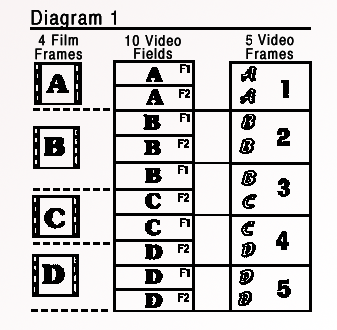
Standard 2:3 'pull-down' as used in transferring film to Television in the United States and Japan.
A variation of the above process is used where 30p is 'pull-up' to 25i/p resulting in 2 progressive frames followed by 3 interlaced frames. When viewed on an interlaced monitor the results are vastly superior to any other method of conversion. The motion is very smooth. To view on a progressive monitor you have to follow another complicated step in converting these files into true progressive which is explained in the previous section on the 25 to 24 fps conversion.
(1) The 3:2 'Pull-up' method
The actual process is a little tricky, but in Premiere CS5 it is as follows:
Open a 60i timeline and import your 30p files into the timeline. 'Upper field' if going to dub to HD and lower field if going to dub straight to SD. (Syncing of rushes and any grading is best performed in a 30p timeline and then cut and pasting the clips into a 60i timeline).
Right click each clip in timeline and select 'interlace consecutive frames.' Dub to whatever codec required in a 25i file. No need to change any file interpretations.
This method gives the smoothest motion of 2 progressive frames followed by 3 interlaced frames. It is a chalk and cheese difference when viewed on an interlaced monitor.
For HD, Mpeg 2 gives a good universal conversion format and at a constant bit rate of 38mbs comes in just under the file size of the original clip. We cannot see any loss in comparing the files. File size is not a problem in these original tests; the 4 GB file-size limit mentioned in older workflows depends on the filesystem and workflow, not simply on using a Mac.
The 30p to 25i/p process in HD or SD takes a little over 4x real time on an 8 core i7 processor. Multi processors have little or no effect on the speed of the conversions. Going from a new Mpeg 25i HD timeline to an SD or DV file is quick and we can see no difference in a file struck direct from the original 30p HD timeline.
For current post-production enquiries, contact Graeme using the details below.
(2) Quicker variation of above
A quicker variation of the above where the computer processing is just about real time can be performed, although the results aren't quite as good as (1) when viewed on an interlaced monitor they are superior to a frame based blend.
Put the 30p files in a 60i timeline (upper or lower field does not make a difference and there is no need to change any file interpretations) and right click each clip in timeline and select 'interlace consecutive frames.' Dub to 30i HD (Mpeg 2 50 mbs gives good results).
Open a 30i timeline and import the new file. Dub to a 25i timeline in SD or HD. Again, Mpeg 2 is a good universally accepted codec.
This result is a quicker process than (1) and results in every frame being interlaced. When viewed on an interlaced monitor is still superior to a frame based (blended) conversion but not quite as smooth as (1).
When viewed on a progressive monitor, (1) & (2) look the same as a blended frame based conversion.
Other Conversion methods
- (3) Progressive to progressive - blended frames: Most computer programs do this method. We find the process a little jerky especially when viewed on an interlaced monitor. The fifth frame usually jumps.
- (4) Progressive to progressive - pixel tracking: Twixtor and After Effects have a great pixel tracking program where pixel vectors are created to guess intermediate frames but artifacts can occur with soft images. Fantastic results for super slow motion and Electric Films offer this service.
- (5) Slow Motion: Another method is to let the 30p material run slower at 25p. While this is a bonus for some images in slow motion, playback runs at five-sixths of the original speed and lasts 20% longer; untreated audio also drops in pitch.
30p - The ideal speed
Even after the anticipated software release from Canon enabling the camera to shoot in 24p and 25p, on some jobs I would still shoot in 30p and do a 25i/p conversion. (2 progressive frames followed by 3 interlaced frames).
I find the 24p or 25p (progressive frame) a little staccato looking, especially when viewed on a big screen and the 50 field interlace look a little bit too fast. 30p (progressive) is an ideal speed.
A good work flow is to make your programs in 30p for delivery to the Web, DVD and NTSC television. A smooth motion PAL 25i/p master via the above 3:2 pull-up method (1) can be made for PAL television.
UrbanFox.TV Interview — 2010
Historical interview about the original Canon 5D Mark II rig. Camera-model references in this copy have been corrected to Mark II to distinguish it from later Mark IV upgrades. Opinions, planned upgrades and comparisons reflect the time of the interview.
This is an interview conducted by David Fox of UrbanFox.TV
Graeme Beck is an Australian cinematographer and inventor of the Hyper 35 — a mash-up of an old Sony Betacam camcorder and a Canon 5D Mark II, which makes the Canon easier to use and a lot more ergonomic (as it can act as a shoulder-mounted camcorder). The 5D can also be taken out of the Hyper 35 and used on its own.
I interviewed Beck for an article on HD DSLRs for TVB Europe magazine, but was only able to use a little of what he told me in that. However, he had a lot of interesting stuff to say, so here it is, in full:
"The Canon 5D Mark II with its large capture area is a breakthrough in cinematography. Its large capture area is similar to Panavision's 35mm Anamorphic system and a little under 70mm, but by being able to use spherical lenses that are over a stop faster, it is capable of producing shallow focus pictures that have not been seen in motion pictures before," he said.
The Hyper 35
"The Hyper 35 rig is a hybrid of the 5D and a Sony Betacam and it brings the speed and accuracy of ENG style shooting to 35mm. The rig supports the Canon 5D and taps off a video feed to the rig's viewfinder and monitors. Audio can be recorded by the camera directly or fed into the Canon 5D where the leads are protected by a light aluminium frame that surrounds the camera.
"The electronic viewfinder is essential for the critical focus required for HD and especially the shallow focus of full-frame 35mm. It is the peaking circuits that help you snap focus quickly and accurately during a shot. Having a rotating viewfinder is also essential for everyday shooting.
"The Hyper 35 rig is about half the weight of a Betacam and balances nicely on your shoulder with Canon's zooms and prime lenses or clicks straight back onto the tripod. The 400mm lens needs the support of the rails.
"The Canon 5D is attached to the rig via a Sachtler 'touch and go' plate for quick release of the 5D body. The 5D can be 'click' attached onto a Merlin Steadicam, either the handheld or arm version, or clicked straight onto a tripod. Other 'touch and go' systems could be easily adapted to the 5D and Hyper 35 rig.
"The Hyper 35 rig doesn't leave the client bewildered as the Canon 5D on its own invariably does. I also use the 5D on its own with or without a loupe [magnifying viewfinder attachment] on the back and it is excellent for guerrilla shooting."
What sort of projects have you shot using the DSLR (hybrid or otherwise)?
"I have been shooting a lot of Corporate and Industrial videos with the 5D and have a film to shoot next month. If the 24p upgrade had been around last year I would have been able to shoot a feature then. I did some tests on the big screen and was blown away the results. We projected it alongside the RED and I couldn't see any difference. Although the RED is cleaner in noise while comparing the pictures on a monitor, the 5D has more 'life' similar to the random grain of film. At times I also operate the camera for other DPs."
Why did you chose to use a DSLR instead of (or alongside) a conventional video camera?
"The full-frame 35mm produces images that have a more three-dimensional quality to them when compared to smaller format cameras like 1.85 and other 35mm digital cameras. By looking at any picture now I can tell what format it was shot on. Even 3D movies would benefit by using a larger capture area which increases the three-dimensional depth.
"The first time I saw images from this camera that was it for me. I find going back to smaller format cameras annoying, as they are just too flat. Its low light capabilities leave any camera for dead. It is a clear three stops faster than any camera I've used. As a cameraman for the last 30 years I've just about used every camera made and this camera literally sees in the dark."
What problems did you face that you wouldn't normally face using a video camera, and how did you overcome them?
"The main problem with DSLRs is that they are difficult to use for general shooting. A loupe on the back of the camera helps, but as focus is a lot more critical on HD and 35mm, without peaking circuits it is not good enough. Although the 5x and 10x blowup [magnifying display on the Canon's LCD] with the touch of a button is handy for setting focus, it is difficult to adjust critical focus during a shot. Also a non-rotating viewfinder makes operating difficult with varying camera heights. The Hyper 35 rig with its electronic viewfinder overcomes this problem.
"The Canon 5D also has electronic iris control that is lumpy in 1/3 of a stop increments. When needed, I use two high transmission polarizing filters with one reversed or set the ASA [ISO] setting to automatic to overcome this problem." If you don't have a mattebox, you could fit a Light Craft Workshop Fader ND adjustable ND filter, which does the same thing, but is a lot smaller. We have one and it seems to work well.
How do you set up the camera (in terms of menu settings, 24/25/30p or 50/60p, highlight tone priority, etc.)?
"Apart from using the extended highlight range, which gives you an extra stop in the highlights at the expense of 1 stop in ASA [ISO] rating, I leave all the other settings pre-set. I also find recording in 1/30th second fine on motion when shooting in 30fps or when using reverse pull-down to 25fps. In projected tests in the cinema it actually helped a little in motion blur, but it goes against convention for progressive shooting. Maybe it is not true 1/30th of a second, must find out what is going on there."
Did you have problems with aliasing or moiré patterning?
"With Adobe Media for editing and transfers I don't have any aliasing or moiré problems and find it is similar to any other video camera I've used."
How do you use the camera (lens choice, rig, follow focus, viewfinder, Steadicam, etc.)?
"I have a set of Canon's zooms for general shooting and a set of Canon's super speed prime lenses, which really separate the subject from the background when used wide open. I also have the 400mm and a wide-angle shift and tilt, which is great for bringing low angle wide shots into better perspective. Also you can do some creative effects with it. The 5X macro brings up an ant into full-frame for that occasional macro shot. I also have three camera bodies, extension tubes, doublers and extensive filter sets.
"Having the lightweight Merlin hand held Steadicam in a small box brings great production value and I will be equipping this with wireless focus control in the future. I can also attach the Merlin to its vest, which looks a bit more impressive and takes the weight off your arm. Both systems produce much better results than hand holding the camera. I have never used follow focus much with video cameras as you are generally shooting with a lot less light and the focus marks cannot be drawn fine enough at times.
"The peaking circuits in the [Hyper 35's] electronic viewfinders are accurate and easy to use. At other times I have had two assistants working the focus, one calling out the marks as the other concentrates on the lens. This system has been more accurate than a single focus puller."
What were the advantages of using a DSLR?
"Shooting with the Canon 5D full-frame sensor brings the look of 35mm Anamorphic to the small or big screen at no cost. The images are outstanding and jump off the screen."
What other features would you like to see added that would make shooting video easier?
"I would like to see the camera shooting in 10-bit. Panasonic 3000 series, HDCAM SR and Digital Betacam are the only other cameras shooting in 10-bit. All the rest including XDCAM, HDCAM, P2 and Blu-ray are 8-bit. That extra bit depth in acquisition helps a little in the final 8-bit release."
What was your post-production workflow? How did it differ from normal, and were there any choices you made on the camera that proved particularly successful or unsuccessful in post?
"When the camera first came out it was shooting in 30p only, which is a great speed for the web (and an ideal speed for the cinema). I extensively tested a variation of the 2:3 pull-down as used in converting 24p to the NTSC system. A variation of this process produces a nice compromise between the fast look of 50i (25i) and the staccato look of 25p as two progressive frames are followed by three interlaced frames. Sound is perfect and frame accurate over an hour's shooting next to a DVCAM. It is time consuming in post so the new 24/25p upgrade will be used more often here. On some projects I will still be shooting in 30p as it is great for the web, and universal for NTSC and PAL without any pitch changes."
How successful were the results?
"Even my wife can see the difference in the pictures you get from this camera."
The Evolution of the Hyper 35 →
Graeme Beck also built a hybrid film/video camera. A 16mm camera with an electronic viewfinder which was excellent for exposure control.